AA's App Will Now Automatically Move You to a Better Seat
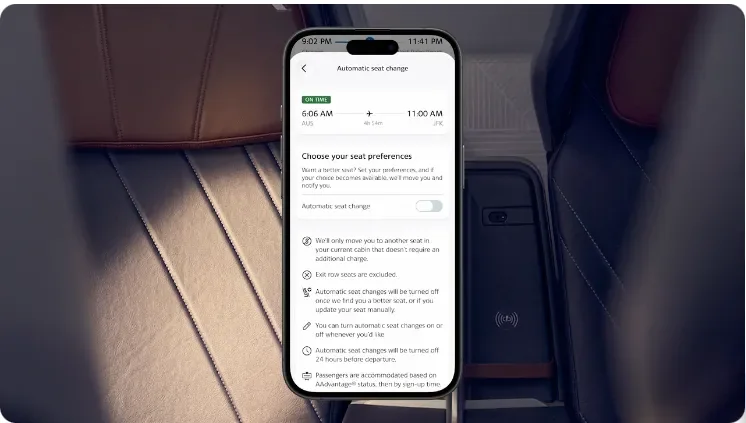
American Airlines just launched a new app feature that monitors seat availability based on your preferences and auto-moves you when a better seat opens up.
American Airlines just launched a new app feature that monitors seat availability based on your stated preferences and automatically moves you when a matching seat becomes available. Here's how it works and why it's useful.
American Airlines announced a new feature in the AA app this week that solves a specific problem most travelers have run into: you book your flight, get an okay-but-not-ideal seat, and then find yourself checking the seat map obsessively over the following weeks hoping something better opens up. This is especially the case for those booking last minute tickets - where the only open seats are undesirable.
That exercise is over - at least for AAdvantage members on single-passenger reservations.

What It Does
AA’s new app feature lets eligible AAdvantage members set seat preferences upon completing their booking. The app then monitors seat availability in the background and automatically moves you when a matching seat becomes available. You get a notification when it happens.
The preferences you can set include window, aisle, or middle seat position. When a seat matching your criteria opens up (within your existing cabin, more on that below), the app updates your reservation and lets you know.
Here’s a nifty video from AA showing the process:
Who's Eligible
The feature comes with a few caveats worth keeping in mind:
- AAdvantage members only. You need to be logged into your AAdvantage account for this to work.
- Single-passenger reservations only. If you're traveling with family, friends, or a companion on the same PNR, this feature isn't available to you. Multi-passenger bookings have more complex seating dynamics that the auto-move feature doesn't handle. This isn’t so different from some of the restrictions in place for using AA’s Touchless ID option for pre-check.
- You must have an assigned seat. If you're on Basic Economy without an assigned seat, or your booking doesn't have seats assigned yet, the tool won’t work.
- The tool is available ip to 24 hours before departure. After that window, the feature stops monitoring.
- Changes are only within the same cabin. Sorry - this new feature won't upgrade you from Main Cabin to First Class. It moves you to a different seat within the cabin you're already in.
The No-Extra-Charge Protection
Here's one other important detail. The feature will not move you to a higher-priced paid seat, even if one becomes available that matches your preferences.
That means if you're in a regular Main Cabin seat and prefer an aisle, the app will move you to an available aisle seat within Main Cabin - but won't slide you into a Main Cabin Extra aisle that costs an upcharge.
Of course for those with higher status tiers, this is a non-concern.
Why This Matters
A few reasons this feature is more useful than it might sound:
- Seat availability is dynamic. People cancel, change flights, get upgraded, or get moved due to operational reasons. Seats that were unavailable when you booked frequently open up in the days or weeks before departure. For example, 1-2 bulkhead MCE seats are often blocked until check-in time.
- The tool is preference-based rather than seat-specific. You're not asking the app to watch for seat 17A specifically. You're saying "I want an aisle" and letting the app find any aisle seats that opens up.
- Reduces app fatigue. Anyone who's booked a busy flight has probably opened the AA app multiple times to check if better seats opened up. This feature eliminates that specific type of pre-trip exercise.
Where This Fits Into AA's Digital Push
This is part of a broader pattern of AA investing in app and digital experience improvements throughout 2026. Between:
- The new travel monitoring features
- The enhanced booking-to-boarding controls
- The digital upgrades
- And now automatic seat monitoring
AA's app has become materially more useful over the past year than it was previously. This isn't groundbreaking technology by any stretch but shows that AA closing that gap makes their app competitive with what's available elsewhere.
How to Use It
The feature is live now in the AA app. When you complete a booking as an eligible AAdvantage member on a single-passenger reservation, you'll see the option to set seat preferences after completing the booking flow.
Just set your window/aisle/middle preference, then let the app do the work. You'll get an in-app notification if a better seat becomes available.

Source: American Airlines Newsroom
Related: Reprice Your AA Tickets: 15 Minutes, $150 Back · The Easy $7 Loyalty Points Play: 1,300 AA Miles + $8 Chase Cashback via AARP